
Table des matières
The order details page contains all the information relating to a purchase made by a participant. It can be accessed from “My orders” → “List” by clicking on an order.
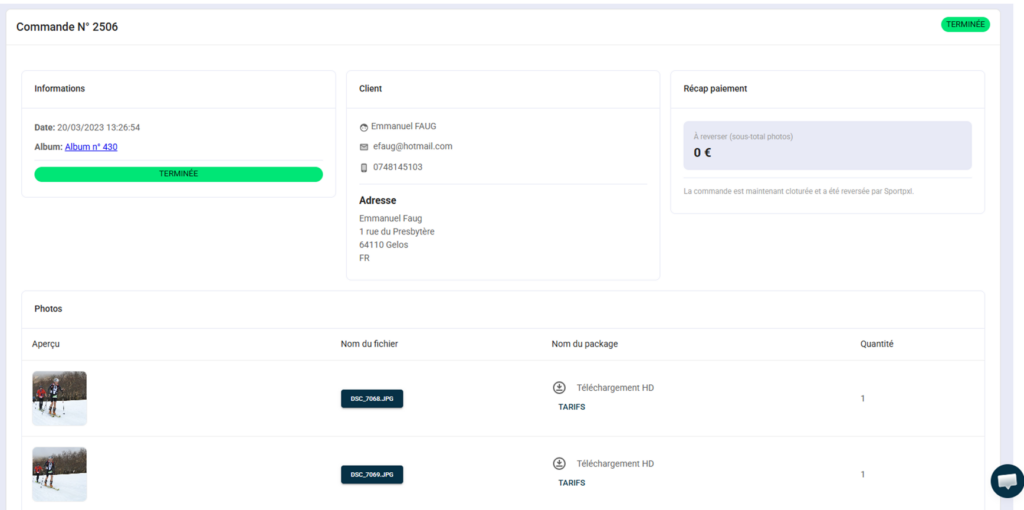
The status #
Displayed at the top right of the page, it indicates the overall status of the order:
- 🟠 To be paid to you — order paid for by the customer, payment pending
- 🟢 Completed — order closed and refunded by Sportpxl
- 📦 Shipped — print order marked as shipped by you
For print orders, change the status to “Shipped” once the parcel has been sent to the customer.
The three blocks of information #
Information
- Date and time of order
- Album concerned — clickable link to the album
- Order status
Client
- Buyer's first and last name
- Telephone
- Postal address — to be used for shipping prints
Payment summary
- Amount to be paid (subtotal photos, net of Sportpxl commission)
- Confirmation of payment if the order is closed — "The order is now closed and has been paid by Sportpxl."
Details of the photos ordered #
At the bottom of the page, a table lists each photo included in the order:
- Preview — thumbnail of the photo
- File name — clickable, allows you to directly download the original file in high resolution — useful for retrieving files to send to your printer
- Package name — the package purchased by the customer (e.g. HD download, 20×30 print, etc.)
- Quantity — the number of copies ordered
💡 To process a print order: download the files by clicking on the file names, send them to your printer, ship the package to the customer, then change the order status to “Shipped”.


