
Sportpxl offers a flexible package system for selling your photos in digital or physical format. You can create your prices directly in the album or import them from your templates.
Access tariff configuration #
Prices are configured in step 2 — Prices when creating the album, or at any time from “Edit my album” → “Prices”.
Create a package #
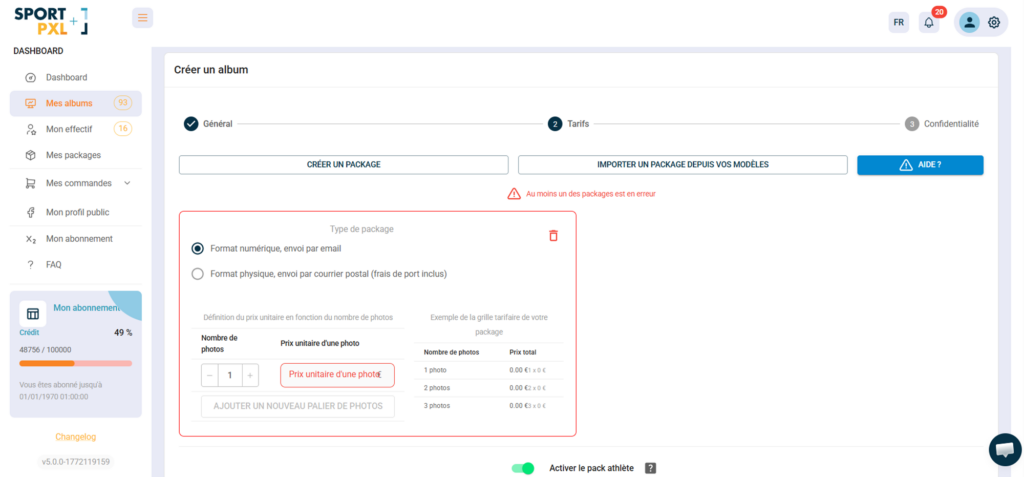
Click on “Create package” and configure the following settings:
Package type #
- Digital format, sent by email — participants upload their photos in high resolution.
- Physical format, sent by post (postage included) — printed copy sent to the participant
Tiered pricing structure Sportpxl offers a tiered pricing structure. You set a unit price per photo based on the number of photos purchased:
- Enter the number of photos in the first tier and the corresponding unit price.
- Click on "Add a new photo tier" to create an additional tier with a lower unit price.
- A preview of the price list is displayed in real time on the right (e.g. 1 photo = £10, 3 or more photos = £7 per photo).
Import a package from your templates #
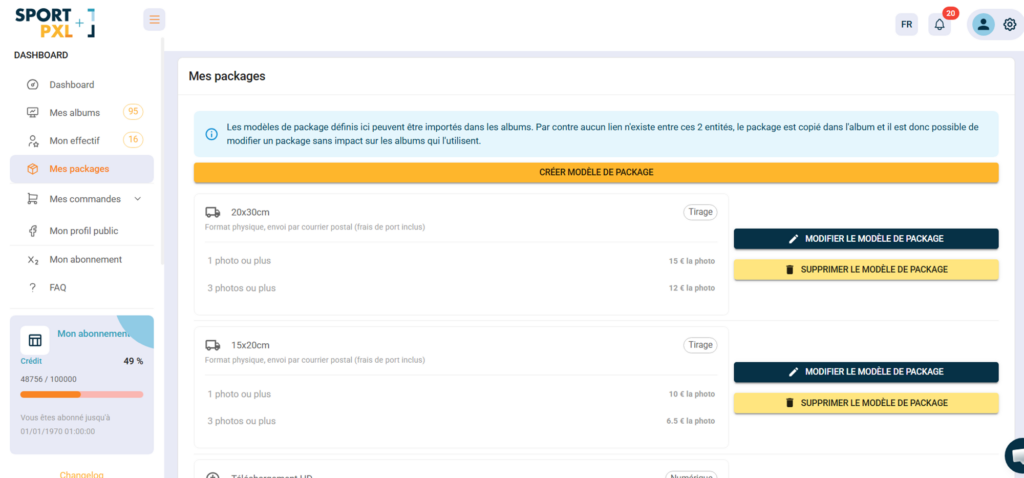
If you have already configured packages on other albums, you can save them as templates and reuse them quickly.
- From "My Packages", create and manage your reusable package templates.
- When configuring the pricing for an album, click on "Import a package from your templates".
- Select the desired template — it is copied to the album
💡 Templates and packages in an album are independent. Editing a template in “My Packages” does not affect albums that already use it — and vice versa.
The athlete pack #
At the bottom of the pricing configuration screen, a “Enable athlete pack” toggle allows you to automatically offer a pack containing all of an athlete’s photos at a preferential rate. This is a particularly effective option for increasing the average basket size — participants are often willing to pay a little more to get all their photos at once.
💡 You can create multiple packages for the same album — for example, an HD digital package, a 15×20 print package, and a 20×30 print package — and let the participant choose when purchasing.


