
The Face + Bib algorithm is the most widely used on Sportpxl. It combines bib detection and facial recognition to reliably identify athletes across all your photos.
💡 This article explains how the algorithm works and how to configure it. To find out when to select it during import, see the article “Steps for importing photos”.
How the algorithm works #
For each photo, Sportpxl performs two detections in parallel:
- It detects faces in the image.
- It identifies the bib numbers present in the image.
It then creates a link between each face and the bib number that is geographically closest to it in the photo — it is this combination of face and bib number that constitutes an identification.
This link is then propagated to all other photos in the album where the same face appears. Thus, an athlete who is clearly identified in one photo will be automatically recognised in all of their photos, even those where their race number is partially obscured.
Configure the algorithm #
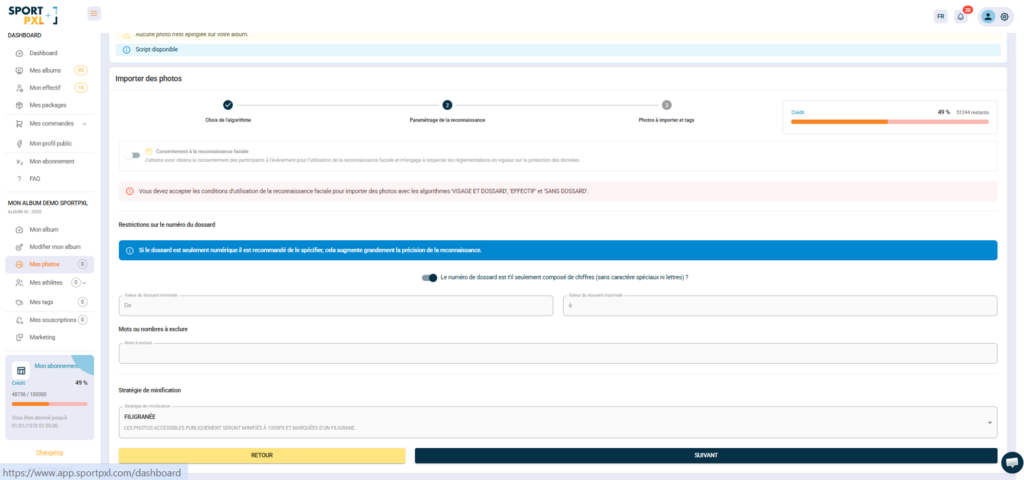
When importing a batch of photos, Sportpxl asks you to enter several parameters that enable the algorithm to filter out false positives and improve detection reliability.
Minimum bib number / Maximum bib number Define the range of valid numbers for this event. Any number detected outside this range will be ignored — this prevents race numbers, kilometre markers or text on jerseys from being read by mistake.
Race number format Indicate whether race numbers are numeric only or contain letters (e.g. 112A, F034). Incorrect settings here will result in bibs being ignored or misread.
Words or numbers to exclude List recurring text on race numbers that does not correspond to a participant number — for example, the distance of the race (72 for a 72 km trail run), the sponsor’s name or the year. Without this exclusion, these elements can be read as valid bib numbers and generate false identifications.
The correction script #
Once all your photos have been imported, you can run the correction script from your album. It analyses all the identifications and applies the validated corrections to all photos of the same face, improving the overall consistency of the album in a single operation.
💡 The correction script should only be run once all your photos have been imported. See the article “When to run the correction script” for details.


