
Sportpxl offers monthly and annual subscriptions to access the platform. Prices are available at sportpxl.com/our-prices/.
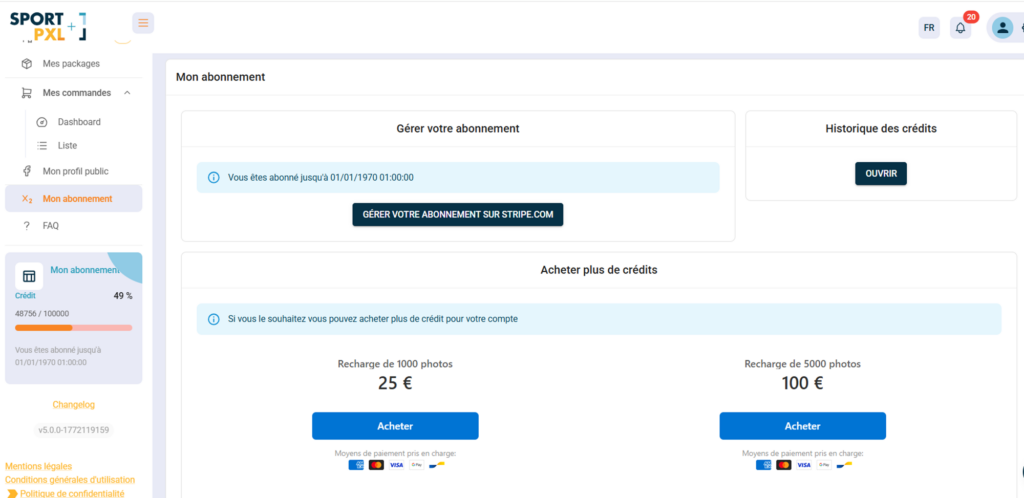
How credits work #
One credit corresponds to one photo imported and analysed by Sportpxl. Some important rules to know:
- Each imported photo consumes one credit, regardless of its size or the algorithm used.
- Deleting a photo does not restore credit — once used, credit is permanently used up.
- Credits accumulate on your account and are not subject to any album, date or event restrictions — you can use them however you like, as long as your account is active.
- As part of a monthly subscription, a new set of credits is automatically added to your counter each month.
- With an annual subscription, all credits are available from the start of the subscription.
Subscribe independently #
From “My subscription”, you can manage your subscription directly online:
- Click on "Manage your subscription on Stripe.com"
- Select your plan (monthly or yearly)
- Pay by credit card — Visa, Mastercard, American Express, Google Pay, and PayPal are accepted.
Your current subscription date is visible at the top of the page.
Customised packages and other payment methods #
If you have specific requirements — large volume of photos, multi-user subscription, payment by bank transfer or any other request — contact the Sportpxl team at contact@sportpxl.com to discuss a tailored offer.
Purchase additional credits #
If you use up your photo quota before the end of your subscription, you can purchase additional credits from “My subscription”:
| Pack | Price |
|---|---|
| 1,000 photo refill | €25 |
| 5,000 photo refill | €100 |
| 10,000 photo refill | €200 |
| 50,000 photo refill | €800 |
Click on “Buy” and pay by credit card — Visa, Mastercard, American Express, Google Pay and PayPal are accepted. Credits are added to your account immediately.
💡 The larger the pack, the lower the cost per photo — the 50,000-photo pack costs €0.016 per photo, compared to €0.025 for the 1,000-photo pack. If you have a large event coming up, plan ahead by purchasing a suitable pack.
View credit history #
Click on ‘Open’ in the ‘Credit history’ section to view details of your usage and top-ups.


