
The income generated from the sale of your photos is collected via Stripe and paid to you by Sportpxl into your bank account. Here’s how to proceed.
Step 1 — Provide your bank details #
Before requesting a transfer, please send your bank details in PDF format to the Sportpxl team at contact@sportpxl.com. This step only needs to be completed once.
Step 2 — Request payment #
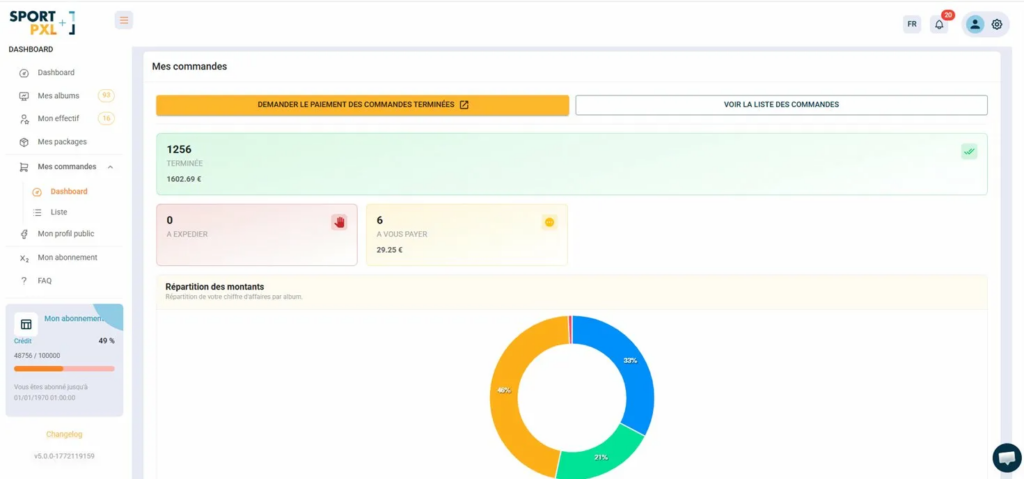
From “My Orders” → “Dashboard”, you can see an overview of your earnings:
- Completed — the number of closed orders and the total amount payable
- To be paid to you — orders paid for by your customers that are awaiting transfer
- To be dispatched — print orders awaiting dispatch
When you wish to collect your earnings, click on the orange button “Request payment for completed orders” — or send an email to contact@sportpxl.com. Sportpxl will then transfer the funds to your bank account.
Distribution of amounts #
The graph at the bottom of the dashboard displays the breakdown of your revenue by album, allowing you to quickly see which events generate the most sales.
💡 The amounts shown are net of Sportpxl commission — this is what you will actually receive. If you have any questions about a payment, please contact contact@sportpxl.com, specifying the order numbers concerned.


