
Table des matières
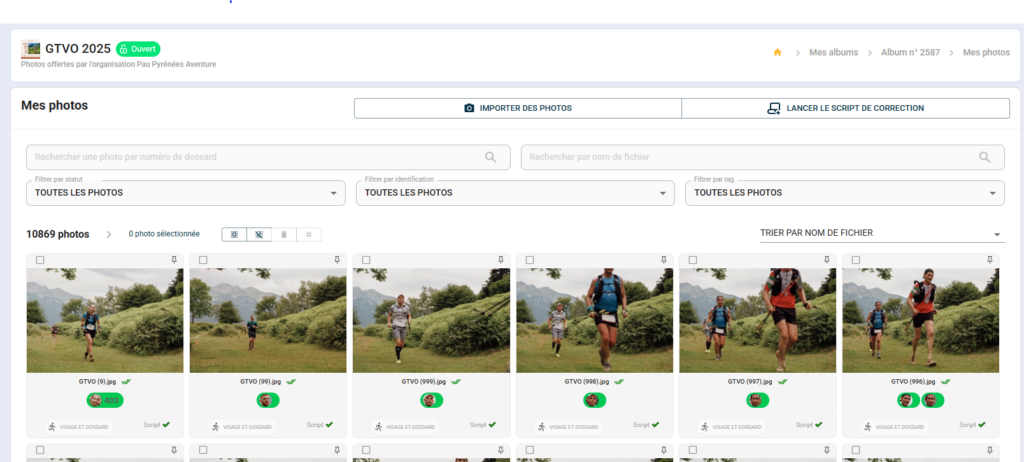
The “My Photos” view offers filtering and sorting options for efficient navigation through an album, even with several thousand photos.
Filter by tag #
If you have organised your imports with tags (event, course point, category, etc.), you can isolate a batch of photos with a single click.
- From "My photos", locate the filter menu by tag.
- Select one or more tags
- The gallery is limited to the corresponding photos.
Filter by identification status #
Useful for prioritising unidentified photos or uncertain identifications.
- From the filter menu, select a status:
- Identified — photos with at least one validated identification
- Unidentified — photos without identification
- To be verified — identifications marked yellow (reliability uncertain)
- The gallery only displays photos corresponding to the selected status.
💡 Start by processing the “To be checked” photos before running the correction script — this significantly improves the quality of the final result.
Sorting photos #
- From the sorting menu, choose the display order:
- By date taken (chronological or reverse chronological order)
- By import date
- By file name
- Sorting is applied immediately to the gallery.
💡 Sorting by date taken is particularly useful at multi-event competitions for finding photos from a specific moment in the day.


