
CSV import allows you to bulk link participants’ contact details (surname, first name, email) to their race numbers, without manual entry. This is a key step in being able to send photos by email to all participants.
Access CSV import
From “My athletes” → “Import”.
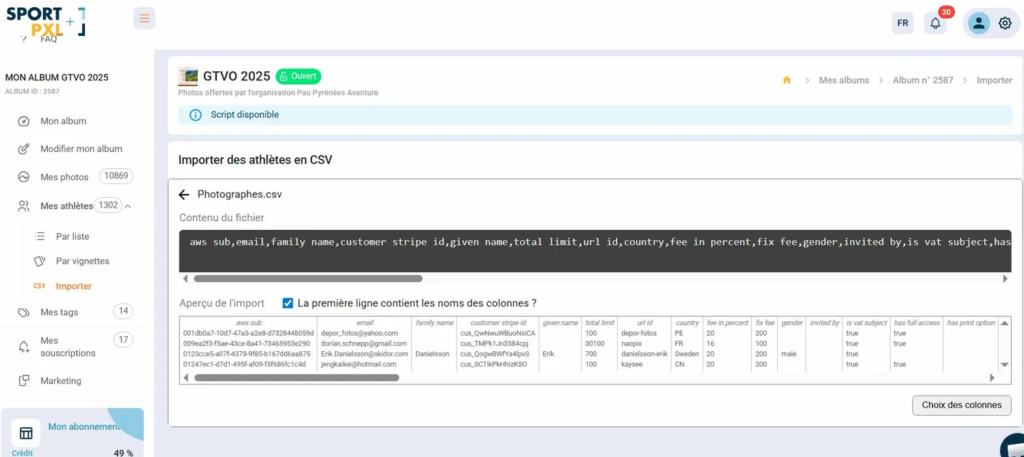
Step 1 — Submit the file #
- Drop your CSV file into the import area
- Sportpxl displays a preview of the file contents and automatically detects columns.
- Ensure that the 'The first row contains column names' box is ticked if your file contains a header row.
- Click on "Column selection" to proceed to the next step.
Step 2 — Link the columns #
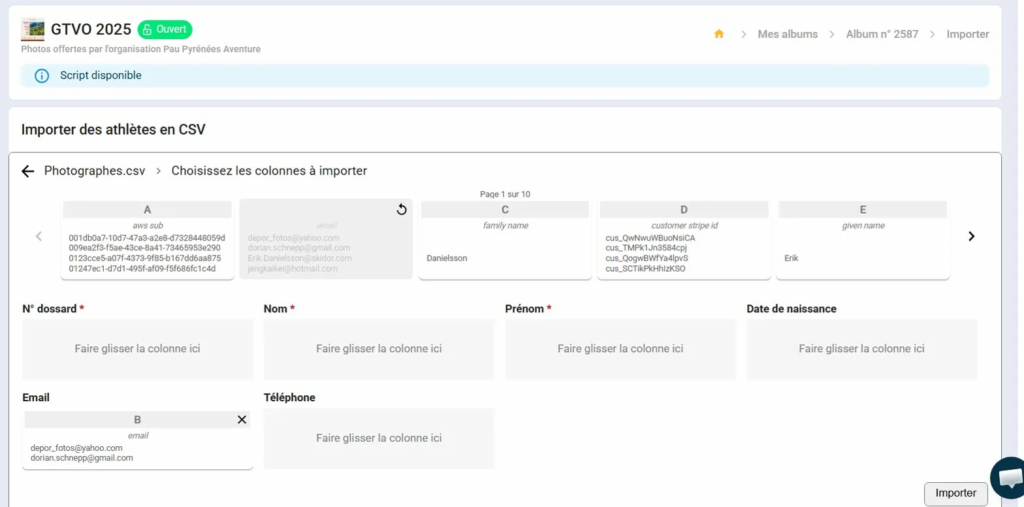
Sportpxl displays the columns of your file at the top of the screen (A, B, C, etc.) and the fields to be filled in below. Drag each column to the corresponding field:
- Bib number (mandatory) — the participant's bib number
- Name (required) — surname
- First name (required) — first name
- Email — for distributing photos by email
- Telephone — optional
- Date of birth — optional
Columns in your file that do not correspond to any Sportpxl fields can be ignored — simply drag only the useful columns.
Step 3 — Import #
- Once the columns have been assigned, click on 'Import'.
- The contact details are linked to the corresponding bib numbers in your album.
Accepted formats #
- CSV file with comma or semicolon separator
- The first line may contain column names or data directly.
- Any export source is compatible (Excel, Google Sheets, timing software, registration platform, etc.) as long as the file contains a column with the bib numbers.
💡 If a CSV bib number does not match any identification in the album, the athlete is still created in the list — they will appear with “No photo” until their bib number is detected in the photos. This is normal if the CSV import is performed before the photos are imported.
💡 You can restart a CSV import at any time to update or complete participants’ contact details, for example if any emails were missing during the first import.


