
The “My Team” feature is designed for sports clubs that want to manage their photos over time — during training, matches or tournaments — by automatically identifying their members across all their albums.
Principle #
You set up your team once and for all with a reference photo for each athlete. Sportpxl then uses these reference photos to automatically identify your members in all your photos, using the Team algorithm. This is a cross-functional management system for the entire season: the same team can be used in all your successive albums without having to recreate profiles for each event.
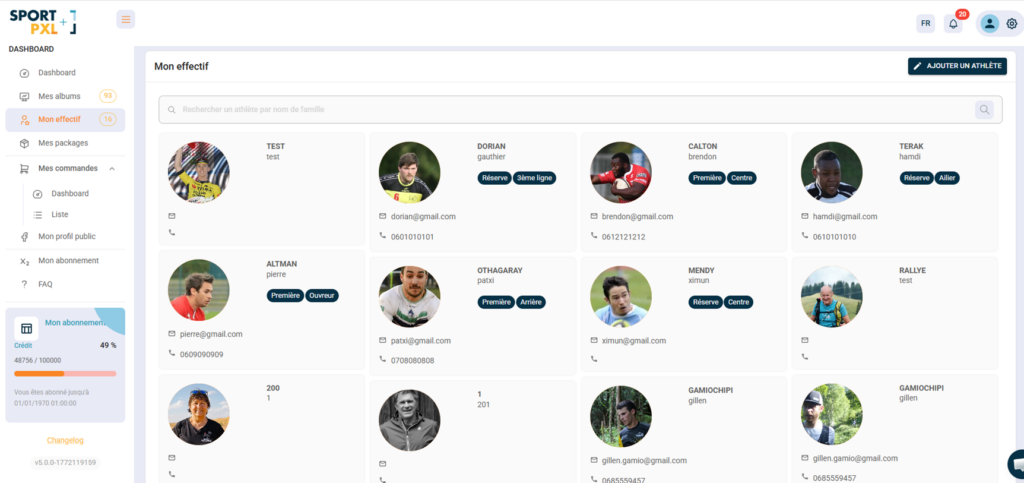
What you see in ‘My Workforce’ #
The page displays all your licence holders as thumbnails, showing the following information for each one:
- His reference photo — used by the algorithm for recognition
- His first and last name
- His contact details — email and telephone number
- His tags — to organise your squad by group, position or category (e.g. Reserve, First Team, Centre, Winger, etc.)
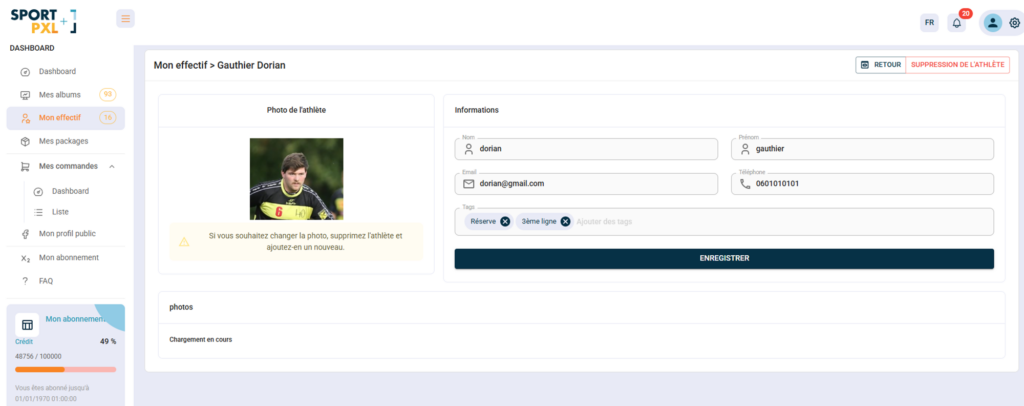
Athlete profile #
Click on an athlete to access their profile and edit:
- His details — surname, first name, email address, telephone number
- His tags — to associate him with a group or position
- His photos — all photos where this athlete has been identified in your albums
⚠️ The reference photo cannot be edited directly. If you wish to change it, delete the athlete and recreate them with the new photo.
Add an athlete to the roster #
- From "My Team", click on "Add an athlete".
- Upload a clear, front-facing, well-lit reference photo — this photo will be used as the basis for facial recognition.
- Enter their surname, first name, email address, telephone number and tags.
- Record
Using the workforce for identification #
Once your team roster has been created, select the “Team Roster” algorithm when importing your photos. Sportpxl automatically compares the faces detected in your photos with the reference photos in your team roster and identifies each recognised athlete.
💡 The quality of the reference photo is crucial to the reliability of recognition. Choose a recent, clear, front-facing photo without sunglasses or headwear. Update it at the beginning of each season if the athlete’s appearance has changed.
💡 Tags allow you to segment your team (e.g. first team, reserves, U18s, etc.) and quickly find photos of a specific group using the gallery filters.


