
Table des matières
Once your photos are online, you can notify all participants who have pre-registered for your album with a single click.
Access the page #
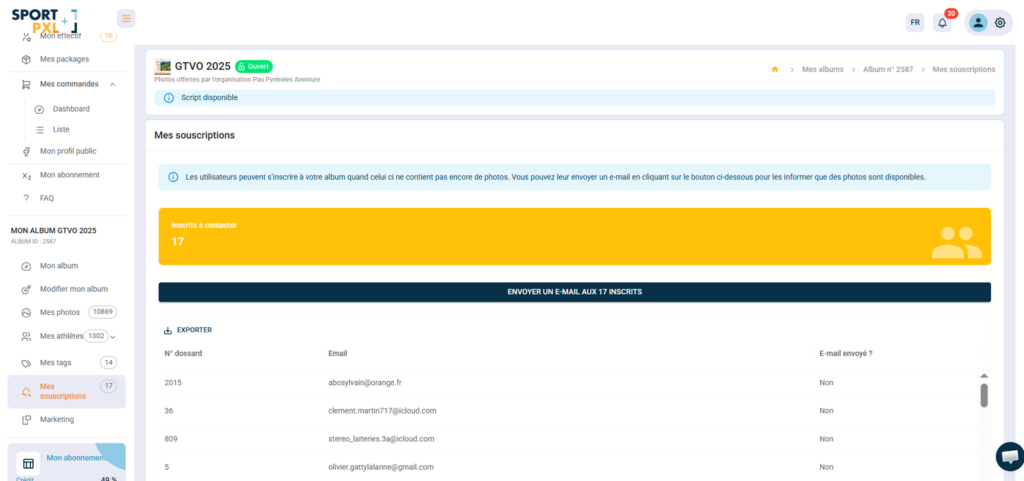
From your album → “My subscriptions”.
What you see #
- The number of registrants to contact — participants who have pre-registered and have not yet received the email
- The list of registrants with their bib numbers, email addresses, and a column labelled "Email sent?" indicating whether the notification has already been sent.
- An "Export" button to download the list of registrants in CSV format
Send the email #
- Check that your album is set to 'Open' status and that your photos are imported and ready.
- Click on the "Send an e-mail to registered X" button.
- A personalised email is sent to each pre-registered participant with a direct link to their photos.
The “Email sent?” column changes to Yes for each registered participant who has been notified.
⚠️ The email is only sent once per subscriber. Ensure that your album is complete and published before triggering the send — you will not be able to resend a notification to the same subscribers.
💡 The more pre-registrations you have, the more immediate sales the alert email will generate. Remember to share the link to your album ahead of the event to maximise registrations — see the article “Communicating effectively before the event”.


