
Understanding the information on the order tracking dashboard #
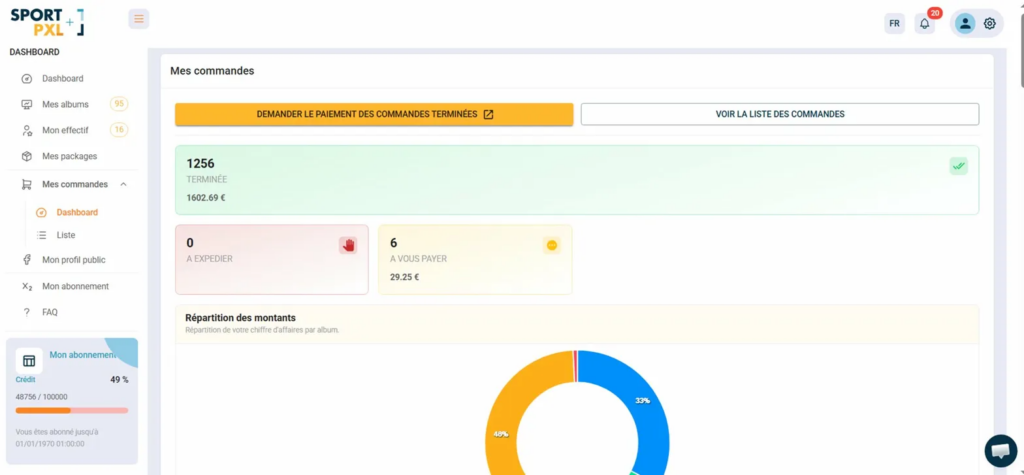
The order dashboard provides you with an overview of your commercial activity across all your albums. Accessible from “My orders” → “Dashboard”.
Key indicators #
Three blocks summarise the status of your orders in real time:
- Completed — the total number of orders closed and the total amount paid out by Sportpxl
- To be dispatched — the number of print orders awaiting physical dispatch to your customers
- Payable to you — the number of orders paid for by your customers that are awaiting payout, with the corresponding amount
Request payment #
The orange “Request payment for completed orders” button allows you to trigger a payment request directly from the dashboard — see the article “How do I collect revenue from my sales?”.
Distribution of amounts #
The ring chart displays the distribution of your revenue by album, allowing you to visually identify which events generate the most revenue.
Details by album #
At the bottom of the dashboard, a summary table shows the following information for each album:
- ID — the album identifier
- Album — the name of the album
- Number of orders — the total number of orders for this album
- Number to ship — the number of print orders awaiting dispatch
- Amount to be paid — the number of orders awaiting payment
- Total to be remitted — the amount pending remittance
- Number completed — the number of orders closed
- Total completed — the total amount of closed orders
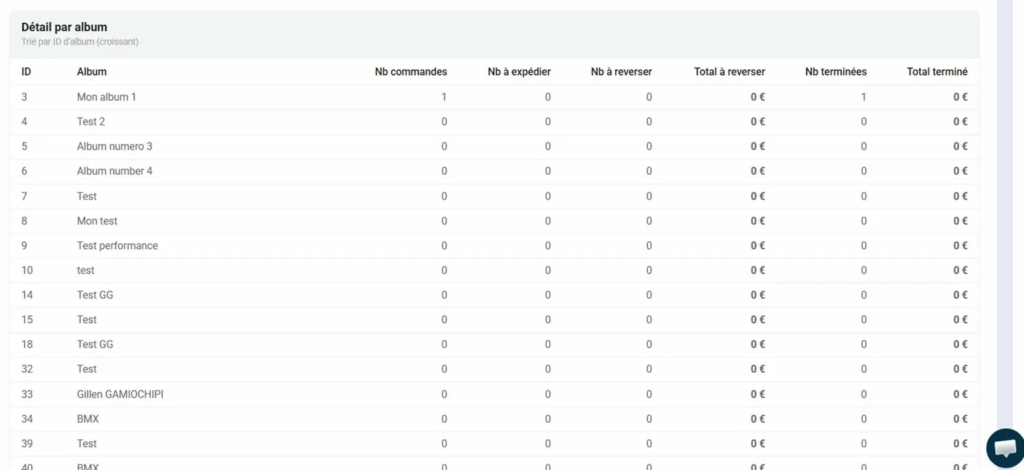
💡 The detailed table by album is particularly useful for tracking the commercial performance of each event and identifying the albums that generate the most sales awaiting payout.


