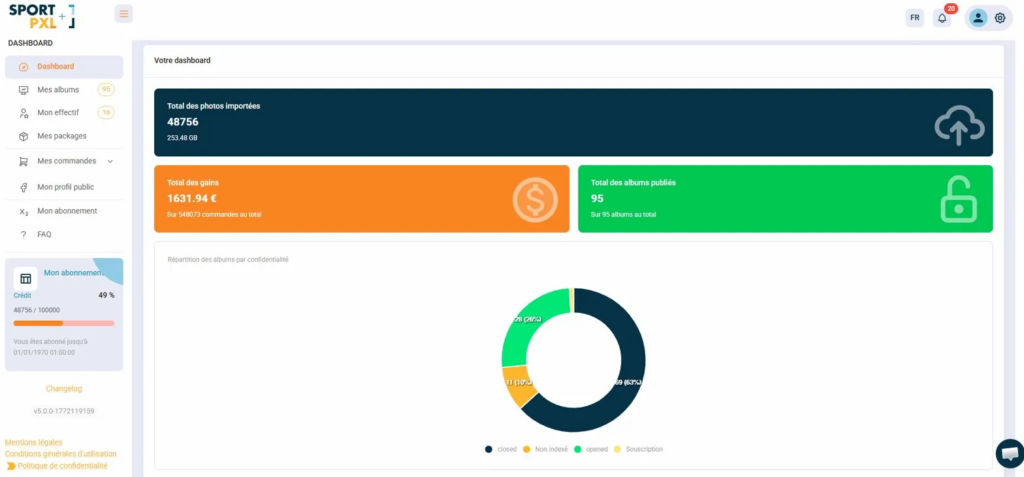
The Sportpxl dashboard provides you with an overview of your activity in real time. Accessible from “Dashboard” in the main menu.
Key indicators #
Three blocks summarise your overall activity:
- Total imported photos — the total number of photos imported across all your albums, as well as the amount of storage space used
- Total earnings — the total amount of your income generated on the platform, with the number of associated orders
- Total albums published — the number of public albums out of the total number of albums created
Album distribution by confidentiality #
The ring chart displays the distribution of your albums according to their privacy status — Closed, Open, Unindexed, Subscription — so you can see at a glance how many albums are publicly accessible.
Credit tracking in the sidebar #
At the bottom of the left-hand menu, the ‘My subscription’ section always displays your credit balance:
- Percentage of remaining credits
- The number of credits used out of the total available
- The progress bar — which turns red when your balance is approaching zero
- The expiry date of your subscription
⚠️ Remember to regularly check your credit balance before a large import — if your balance is insufficient, photos exceeding the quota will not be analysed. Top up from “My subscription” if necessary.
The orders dashboard #
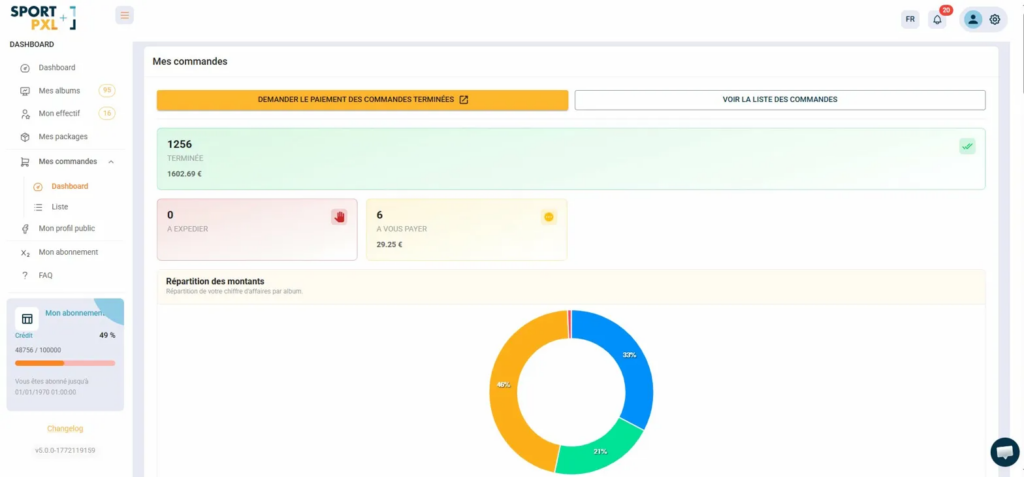
From “My Orders” → “Dashboard”, you will find a dedicated tracking system for your commercial activity:
- Completed — the number of orders closed and the total amount paid out
- To be dispatched — print orders awaiting dispatch
- To be paid to you — pending orders and the corresponding amount
- Breakdown of amounts — graph showing your revenue per album
The orange “Request payment for completed orders” button allows you to trigger a transfer directly from this dashboard — see the article “How do I collect revenue from my sales?”.