
The correction script is an essential step in the Sportpxl workflow. It must be run after importing all your photos — without exception.
Why it is imperative #
The correction script analyses all the album identifications and applies the validated corrections to all photos of the same face. If it is launched during import, it cannot process photos that are not yet present — the result will be incomplete and you will need to relaunch it.
Once all your photos have been imported, run it systematically, regardless of the algorithm used.
Special case: algorithms without a bib number #
With Sans dossard algorithms, the correction script plays an additional role: athletes are only created in “My Athletes” after it is launched. Until the script has run, the detected faces are not yet grouped into athlete profiles — so you cannot assign names or share the photos.
⚠️ With this algorithm, do not attempt to assign names or send photos before running the script — the athlete profiles do not yet exist.
Special case: photocall + proof #
If you are combining a photocall import (Face + Bib number) and an event import (Without bib number), import both batches in their entirety before running the script. The script links the faces identified at the photocall to the action photos.
Procedure #
- Check that all your photo batches have been imported correctly.
- If necessary, carry out an initial manual correction of the most obvious yellow identifications.
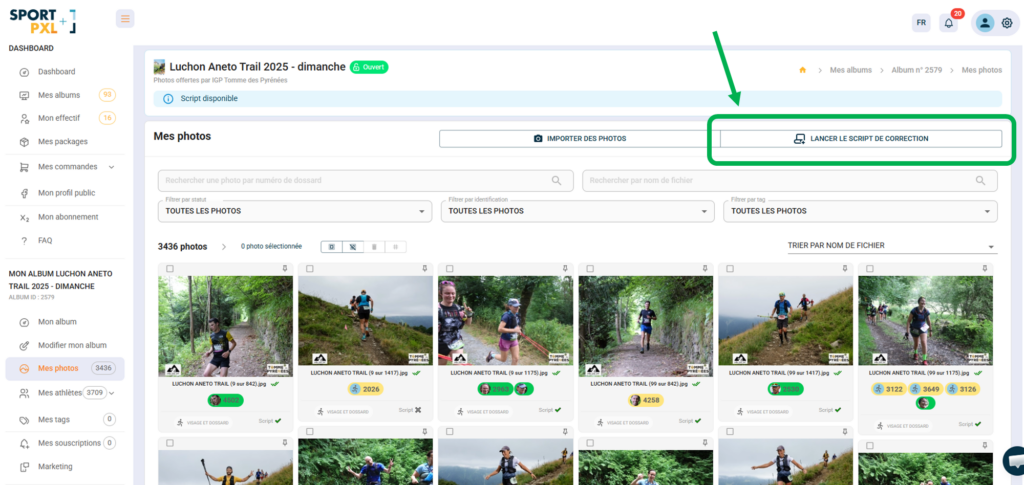
- From your album, click on "Run the correction script".
- Wait until the processing is complete before sharing or sending the photos.
💡 The script may take a few minutes to run on large albums. You can leave the page while it is running — it runs in the background.


